PlantTools
Get More Out of AutoCAD Plant 3D
PlantTools extend AutoCAD Plant 3D with powerful functionality for data management, automation, reporting, data integration, and project standards in plant engineering.
Reduce manual work steps, maintain project data more precisely, and speed up recurring tasks in your Plant 3D projects. PlantTools were built from real-world requirements in plant engineering and can be used individually or as a complete suite.
Overview of the PlantTools
Buy PlantTools now
PlantTools Bundle
Short description of this product variant
Who are PlantTools built for?
Project managers
Generate reports, data sheets, and analyses from current project data without depending on a CAD workstation.
Project engineers
Add technical information centrally, integrate data from Excel or external sources, and track data status across the project.
P&ID designers
Automate recurring tasks, use pipe-class data directly in the P&ID, and reduce manual data entry.
3D designers
Use existing project information in 3D modeling, check for clashes, and reduce rework.
CAD managers
Synchronize project standards, classes, properties, symbols, and configurations across multiple projects.
Which challenge do you want to solve?
Edit project data without AutoCAD Plant 3D
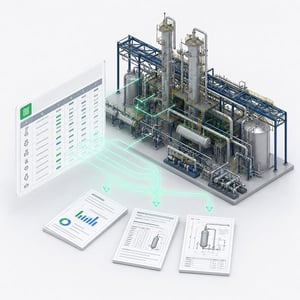
Edit project data in a tabular interface, even on workstations without AutoCAD Plant 3D installed. Add technical information, import or export data via Excel, and manage objects that haven't yet been placed in a drawing.
Typical functions: data editing without CAD, Excel import/export, not-placed objects, access to project data outside the CAD environment, parallel data maintenance.
Automate routine tasks and workflows
Typical functions: project copy and rename, clash detection, change log, DWG export, renumbering, properties palette, symbols palette, project setup import and export.
Connect external data sources and systems
Connect Plant 3D projects to external data sources such as Excel, databases, or ERP systems. Technical information can be transferred automatically to Plant 3D objects, so data doesn't need to be maintained manually in multiple places.
Typical functions: database connectivity, Excel connectivity, ERP integration, data flow within P&IDs, automatic transfer of external information, control of properties such as layer or color.
Create reports, data sheets, and analyses
Generate reports, lists, data sheets, and project analyses directly from your Plant 3D data. Compare versions and revisions so changes remain traceable throughout the project.
Typical functions: reports, data sheets, bills of materials, revision comparison, change comparison, analyses from Plant 3D project data, reporting without an AutoCAD Plant 3D workstation.
Intelligently connect P&ID and 3D
Use pipe-class data directly in the P&ID and carry relevant information through to 3D modeling. PlantSpecDriven supports the transition from P&ID to 3D and helps you catch discrepancies between drawing and model earlier.
Typical functions: pipe-class data in the P&ID, P&ID-to-3D workflow, consistency checking, bills of materials from P&ID data, transfer of relevant component information.
Synchronize project standards and configurations
Synchronize classes, properties, symbols, and project settings between reference projects and active projects. This lets you roll out standards in a controlled way, without manually comparing and adjusting every project.
Typical functions: project comparison, configuration synchronization, standards rollout, reference-project management, updating multiple projects.
Typical use cases with PlantTools
Situation: Project managers and engineers need current data but don't always have access to AutoCAD Plant 3D, or need to maintain data outside the CAD environment.
Solution: PlantDataManager provides project data in a tabular interface. PlantReporter generates reports, data sheets, and lists from it. Added information can flow into evaluations even if it hasn't been placed graphically in a drawing.
Tools used: PlantDataManager + PlantReporter
Situation: Technical data exists in ERP systems, Excel lists, or databases and needs to be linked to Plant 3D objects and used in reports.
Solution: PlantLink connects external data sources to Plant 3D objects. PlantDataManager enables control and editing of project data. PlantReporter generates reports, data sheets, and evaluations from it.
Tools used: PlantLink + PlantDataManager + PlantReporter
Situation: Properties, classes, symbols, and project settings need to stay identical across multiple projects, without manually checking each one.
Solution: PlantSync compares reference projects with active projects and synchronizes configurations. PlantExpressTools adds functions for importing and exporting classes, properties, and symbol information.
Tools used: PlantSync + PlantExpressTools
Situation: Information from the P&ID shouldn't have to be re-entered in 3D modeling. At the same time, discrepancies between P&ID and 3D should become visible earlier.
Solution: PlantSpecDriven uses pipe class data directly in the P&ID and supports transferring relevant information toward 3D. PlantExpressTools adds automation functions for recurring P&ID tasks.
Tools used: PlantSpecDriven + PlantExpressTools
Situation: Technical data, drawings, properties, and reports change during the project. These changes need to remain traceable.
Solution: PlantExpressTools logs changes to properties. PlantDataManager shows data changes and supports editing outside the CAD environment. PlantReporter generates comparable report versions and revisions.
Tools used: PlantExpressTools + PlantDataManager + PlantReporter
Situation: Multiple designers work in parallel, data changes regularly, and project standards need to stay current across active projects.
Solution: PlantSync keeps configurations and standards consistent. PlantDataManager enables parallel data maintenance. PlantReporter creates evaluations of project status. PlantExpressTools supports recurring administrative tasks.
Tools used: PlantSync + PlantDataManager + PlantReporter + PlantExpressTools
What our customers say
Vogelbusch Biocommodities, Austria
PlantTools grow with your requirements
Every company works differently. That's why day-to-day project work often surfaces requirements that standard functions can't fully cover. Together with our customers, we continuously develop PlantTools further, adding new capabilities for real-world use cases in plant engineering. Alongside developing the standard modules, we also review custom extensions when special project requirements arise.
Have a requirement PlantTools doesn't cover yet? Get in touch. Together we'll find the right solution.
Questions about PlantTools?
Tell us where you want to speed up work in AutoCAD Plant 3D. Our team will show you which functions fit your workflow.